Sunday, November 12, 2017

How Containers are more lightweight than Virtual Machines

Docker containers share the host’s kernel, network stack, and filesystem drivers, and generally don’t run complex services like systemd or CPU'S or sshd; they only run the packaged application.

A VM generally has a virtualized network setup and disk and runs a full-blown operating system, on top of the OS the host is already running.

What’s hard to do in Docker?

A container doesn’t actually have a NIC, doesn’t actually run a DHCP client, and can’t (easily) run low-level network protocol software; Docker “borrows” the host iptables for its own use and if you want very specific network policy per container it can get tricky; host storage is shared across all containers and you can’t readily assign a quota to a container.

In a VM there is a (virtual) NIC, and a DHCP client, and a firewall inside the VM, and so on.

Docker Sweet Spot

I feel like Docker’s sweet spot is as a packaging and distribution mechanism for network services that speak “simple” TCP protocols, like HTTP.

Thursday, July 23, 2015

How does YARN compare with Mesos?

Both systems have the same goal: 

Allowing you to share a large cluster of machines between different frameworks. 

Yarn:
For those who don't know, NextGen MapReduce is a project to factor the existing MapReduce into a generic layer that handles distributed process execution and resource scheduling (this system is called YARN) and then implement MapReduce as an application on top of this.

Mesos:- 

Mesos was originally an academic research project with a very similar goal. They created a system which could run a patched version of Hadoop, MPI and other things. This has grown into an Apache Incubator project in its own right.

I have been looking into these two a bit because we would love something like this at LinkedIn, and the nature of these things is that you really only want one (since you want to run everything on it). So at the moment we don't have any real experience running stuff on top of either of these, but here is what I have pieced together (may be wrong in places):

Nextgen MapReduce (aka YARN) is primarily written in java with bits of native code. Mesos is primarily written in C++. YARN only handles memory scheduling (e.g. you request x containers of y MB each), but with plans to extend it to other resources. Mesos handles both memory and CPU scheduling. In practice I think the OS handles CPU scheduling pretty well so I am not sure that would help our use cases. 

Supporting some kind of disk space and disk I/O scheduling and enforcement would be super cool, Mesos uses Linux container groups (http://lxc.sourceforge.net), and YARN uses simple unix processes. 

Linux container groups are a stronger isolation but may have some additional overhead.The resource request model is weirdly backwards in Mesos. In YARN you (the framework) request containers with a given specification and give locality preferences. 

In Mesos you get resource "offers" and choose to accept or reject those based on your own scheduling policy. The Mesos model is a arguably more flexible, but seemingly more work for the person implementing the framework.YARN is a pretty epic chunk of code, including all kinds of things right down to its own web framework. It is about 3x as much code as Mesos.

YARN integrates something similar to the pluggable schedulers everyone knows and loves/hates in Hadoop. So if you are used to the capacity scheduler, hierarchical queues, and all that, you can get something similar. 

I don't think the Mesos scheduling capabilities are quite as robust (they list hierarchical scheduling on their roadmap).YARN integrates with Kerberos and essentially inherits the Hadoop security architecture. 

I don't think Mesos attempts to deal with security.YARN directly handles rack and machine locality in your requests, which is convenient. In Mesos you can implement this, but it is less out of the box. 

Mesos is much more mature as a project at this point. It is a standalone thing, with great documentation, and good starter examples. YARN exists only on hadoop trunk (and some feature branches) in the mapreduce directory, and the docs are super sparse. 

Framework comparisons:-

Mesos is a meta, framework scheduler rather than an application scheduler like YARN.
Suppose we want to run 1000 MapReduce jobs and 1000 SPARK jobs in Mesos. First we need to set up the Hadoop and SPARK in Mesos, then we submit each job to its corresponding framework. Hadoop will schedule the 1000 MapReduce jobs and SPARK will schedule the 1000 SPARK jobs. If we want to run the 1000 MapReduce jobs in multiple Hadoop frameworks, we need to manually set up more Hadoop instances, then we decide which Hadoop instance each job is submit to. Overall, we submit jobs directly to the frameworks and Mesos is not aware of the jobs; we are responsible to set up frameworks.

In YARN, we can submit all the 2000 jobs to YARN, which will launch either a Hadoop or SPARK instance for each of the job. YARN will schedule all the 2000 jobs together, given their resource requirements. After one job is done, YARN will shutdown the corresponding Hadoop or SPARK instance. Overall, we submit all jobs to YARN and YARN schedules all of them; YARN is responsible to set up the "one-time framework" for each job.


Mesos For IOT Applications:-

YARN is Hadoop-specific and is, therefore, specifically targeted at scheduling Hadoop-style, map-reduced data-driven workloads.  In contrast, Mesos can run any kind of workload, including frameworks that are not built on top of Hadoop, such as a Ruby or Python app. One of the most common use-cases for Mesos is running web applications and other long-running services in both single-framework and multi-framework environments. Developers choose Mesos for it's scheduling and bin-packing capabilities, but also for it's ease of deployment, fault-tolerance and app portability.
My prediction is that YARN will find it's rightful place as a next-generation scheduler for Hadoop-driven workloads, whereas Mesos will redefine how we build the next-generation of distributed web, mobile and IoT applications.

Conclustion:-

There seems to be a lot of momentum, it is just early.YARN is going to be the basis for Hadoop MapReduce going forward, so if you have a big Hadoop cluster and want to be able to run other stuff on it, that is likely appealing and will probably work more transparently than Mesos. YARN was written by the Yahoo/HortonWorks Hadoop team which has should know a thing or two about multi-tenancy and very large-scale cluster computing. YARN is not yet in a stable Hadoop release so I am not sure how much actual testing it has had or the extent of deployment internally at Yahoo. 

Regardless, if/when the YARN team is able to get the majority of the worlds Hadoop clusters successfully running on top of YARN, that will likely get the project to a level of hardening that will be hard to compete . Mesos ships with a number of out-of-the-box frameworks ported to it. This somewhat helps to validate the generality of their framework, but i don't know how much of a hack the various ports of things to it are.


Saturday, May 2, 2015

What is the difference between docker and Lxc?

From the launch of docker Top cloud service providers launched their container services for enterprises.


But few of them are still hang out with basic questions like What is docker, difference between docker and LXC, docker and VM.

So in this post we explore the actual differences between docker and LXC.

Docker is not a replacement for lxc. "lxc" refers to capabilities of the linux kernel (specifically namespaces and control groups) which allow sandboxing processes from one another, and controlling their resource allocations.
lxc vs docker


On top of this low-level foundation of kernel features, Docker offers a high-level tool with several powerful functionalities:
  • Portable deployment across machines. Docker defines a format for bundling an application and all its dependencies into a single object which can be transferred to any docker-enabled machine, and executed there with the guarantee that the execution environment exposed to the application will be the same. Lxc implements process sandboxing, which is an important pre-requisite for portable deployment, but that alone is not enough for portable deployment. If you sent me a copy of your application installed in a custom lxc configuration, it would almost certainly not run on my machine the way it does on yours, because it is tied to your machine's specific configuration: networking, storage, logging, distro, etc. Docker defines an abstraction for these machine-specific settings, so that the exact same docker container can run - unchanged - on many different machines, with many different configurations.
  • Application-centric. Docker is optimized for the deployment of applications, as opposed to machines. This is reflected in its API, user interface, design philosophy and documentation. By contrast, the lxc helper scripts focus on containers as lightweight machines - basically servers that boot faster and need less ram. We think there's more to containers than just that.
  • Automatic build. Docker includes a tool for developers to automatically assemble a container from their source code, with full control over application dependencies, build tools, packaging etc. They are free to use make, maven, chef, puppet, salt, debian packages, rpms, source tarballs, or any combination of the above, regardless of the configuration of the machines.
  • Versioning. Docker includes git-like capabilities for tracking successive versions of a container, inspecting the diff between versions, committing new versions, rolling back etc. The history also includes how a container was assembled and by whom, so you get full traceability from the production server all the way back to the upstream developer. Docker also implements incremental uploads and downloads, similar to "git pull", so new versions of a container can be transferred by only sending diffs.
  • Component re-use. Any container can be used as an "base image" to create more specialized components. This can be done manually or as part of an automated build. For example you can prepare the ideal python environment, and use it as a base for 10 different applications. Your ideal postgresql setup can be re-used for all your future projects. And so on.
  • Sharing. Docker has access to a public registry (https://registry.hub.docker.com/) where thousands of people have uploaded useful containers: anything from redis, couchdb, postgres to irc bouncers to rails app servers to hadoop to base images for various distros. The registry also includes an official "standard library" of useful containers maintained by the docker team. The registry itself is open-source, so anyone can deploy their own registry to store and transfer private containers, for internal server deployments for example.
  • Tool ecosystem. Docker defines an API for automating and customizing the creation and deployment of containers. There are a huge number of tools integrating with docker to extend its capabilities. PaaS-like deployment (Dokku, Deis, Flynn), multi-node orchestration (maestro, salt, mesos, openstack nova), management dashboards (docker-ui, openstack horizon, shipyard), configuration management (chef, puppet), continuous integration (jenkins, strider, travis), etc. Docker is rapidly establishing itself as the standard for container-based tooling.


Sunday, December 28, 2014

How to automate Large Scale log Parsing using Logstash?

Logstash is an application tool for Managing your events and logs. You can use it to collect logs, parse them, and store them for later use or real time Parsing using advanced Streaming Techniques.

In the current trend of Application Development and Automation Practices immediate action which are taken against customer data within a Short time span  or visualize their application current Status From Log data will benefit the customer to save their Pockets on vulnerable activities.

LogStash been bundled with many Open Source log Processor Features.  Application logs like Apache, Collectd , Ganglia and log4j etc. Other than this Logstash can also able to Process all types of  System logs, webserver logs, error logs, application logs and just about anything you can throw at it.

LogStash is Developed with Combination of Java and Ruby. Its an opensource you can vist the Logstash in below url

Github Url : - https://github.com/elasticsearch/logstash

LogStash been Mainly Falls under Four categories

1) Input

2) Codec

3) Filter

4) Output


Logstash Prerequisties:-

The only prerequisite required by Logstash is a Java runtime. It is recommended to run a recent version of Java in order to ensure the greatest success in running Logstash.

Download a latest version from

http://www.elasticsearch.org/overview/logstash/download/

wget https://download.elasticsearch.org/logstash/logstash/logstash-1.4.2.tar.gz

Untar the Logstash File

tar -zxvf  logstash-1.4.2.tar.gz

cd logstash-1.4.2/

Now run the Logstash by Command

bin/logstash -e 'input { stdin { } } output { stdout {} }' 

Now type something into your command prompt, and you will see it output by Logstash


Now we type:-

Hello OpenSourceCircle

The Output Screen shows:-

2014-12-02T15:12:23.490+0000 0.0.0.0 Hello OpenSourceCircle.

Here we ran logstash with stdin and stdout. So what text you are typing in command line shows as output below in Structured format.

Life of an Event :

Inputs, outputs, codecs and filters are the core concepts of logstash. 

Inputs:-

Inputs are the main mechanism for passing log data to logstash. 


  • file - read file from a file system. Like the output of tail commandn  in linux.
  • syslog - To parse syslog messages. 
     Popular Input Mechanisms are collectd, s3, redis, rabbitmq, etc.

Codecs:-

Codecs are stream operations for input and output data. It easily interpret the transport of your messages from the Serialization. Popular Codecs are json, multiline

Filters:-

Filters are used as on intermediate to act upon the Input data and take action with some conditions and filter the unimportant data.

  • grok - Grok Parse the arbitrary text and structure the data.
  • drop - drop an event completely ex: debug events
Outputs:-

Outputs are the last stage in LogStash Lifecycle. When the Output stage is completed the event been marked as executed.

  • csv
  • elasticsearch
  • json
  • http
  • cloudwatch
Now we can see the real time example of logstash using access logs of apache server. 

we can configure the logstash in localhost or webserver based on your need and use a conditional to process the events.

Create an file based on your wish, I name it the file as opensourcecircle-apache.conf

Paste the Below contents in conf file.

input {
  file {
    path => "/var/log/apache2/access_log"
    start_position => beginning
  }
}

filter {
  if [path] =~ "access" {
    mutate { replace => { "type" => "apache_access" } }
    grok {
      match => { "message" => "%{COMBINEDAPACHELOG}" }
    }
  }
  date {
    match => [ "timestamp" , "dd/MMM/yyyy:HH:mm:ss Z" ]
  }
}

output {
  stdout { codec => rubydebug }
}


Once you paste and save the file run logstash as bin/logstash -f opensourcecircle-apache.conf.

You Should able to see the output data in Command line.

We can also add Elasticsearch to save the log data by adding this configuration in output section by :-

elasticsearch { host => localhost  } 


Now the logstash open the configured apache access log file and start to process the events encountered. You can adjust the path of log file defined for apache access log.

Points to Note:-

1) The output lines been stashed with the type "field" set to "apache-access" (By the configuration line in filter as type "apache_access").

2) grok filter match the standard apache log format and split the data into separate fields.

3) Logstash not reprocess the events which were already encountered in the access log file and its able to save its positions in files and only process the new line when they are added.


Monday, November 17, 2014

What is Mean by Sharding?

Sharding is a type of database partitioning that separates very large databases into smaller, faster, more easily managed parts called data shards and can be spread across multiple servers. The word shard means a small part of a whole.

The concept of Database Sharding has been gaining popularity over the past several years, due to the enormous growth in transaction volume and size of business application databases. This is particularly true for many successful online service providers, Software as a Service (SaaS) companies, and social networking Web sites.


Database Size Grow Year By Year
The governing concept behind sharding is based on the idea that as the size of a database and the number of transactions per unit of time made on the database increase linearly, the response time for querying the database increases exponentially. 

Additionally, the costs of creating and maintaining a very large database in one place can increase exponentially because the database will require high-end computers. In contrast, data shards can be distributed across a number of much less expensive commodity servers. Data shards have comparatively little restriction as far as hardware and software requirements are concerned. 
Database Sharding Challenges:-
  • Reliability
  • Distributed queries
  • Avoidance of cross-shard joins
  • Auto-increment key management
  • Support for multiple Shard Schemes
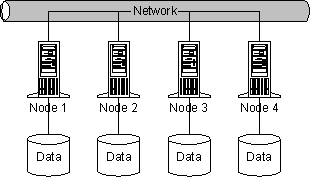
The basic concept of Database Sharding is very straightforward take a large database and divide into a number of smaller databases across servers. The concept is illustrated in the following diagram:


The reasons for the performance and scalability challenges are inherent to the fundamental design of the database management systems themselves.  Databases rely heavily on the primary three components of any computer:  CPU, memory and disk. 


Each of these elements on a single server can only scale to a given point-after that, you need to take additional measures to improve performance.  While it is common knowledge that disk I/O is the primary bottleneck, as database management systems have improved they also continue to take greater advantage of CPU and memory. 

Therefore, as business applications gain sophistication and continue to grow in demand, architects, developers and database administrators have been presented with a constant challenge of maintaining database performance for mission-critical systems.  This landscape drives the need for database sharding.

Historically, sharding a database required manually coding data distribution policies directly into your applications. Application developers would write code that stipulates directly where specific data should be placed and found.  In essence developers were creating work-around code to solve a database scalability problem so their applications could handle more users, more transactions and more data. 


In some cases, database sharding can be done fairly simply. One common example is splitting a customer database geographically. Customers located on the East Coast can be placed on one server, while customers on the West Coast can be placed on a second  server. Assuming there are no customers with multiple locations, the split is easy to maintain and build rules around.


Fig 2. Separate Database table based on each location

Using an example can help explain MySQL sharding more clearly, so let’s take the following table:


This is a small table containing a list of customers. Any modern database can handle such a table. But happens if instead the table has to store seven million rows instead of just seven rows?

Theoretically, this should not be a problem.  But usually there are lots of operations on such a large table – for example we may have many read and write operations on this table every second.In practice, a very large customer table can become a database bottleneck. Why? Because it doesn’t fit in the database server cache anymore, because of database isolation management, and for other reasons that cause the database to crawl under load.


How does sharding solve MySQL Scalability?

If we take the customers table, and split it into four different databases, each database will contain 1.80 million rows. That’s still a lot, but less than 8 million rows. This will result in improved database performance. In fact the following diagram shows how such a table can be split:

MySQL Data Distribution Database


Data distribution Database

Every database will get some of the rows. In old-fashioned do-it-yourself sharding, it was the developer’s responsibility to create an efficient, application-specific data distribution policy that efficiently stipulated exactly where each row should be stored and found for each table. Nowadays, that work is simplified and automated using Mysql Clustering.


Saturday, November 15, 2014

What is ElasticSearch?

Elasticsearch is a search server based on Lucene. It provides a distributed, multitenant-capable full-text search engine with a Restful web interface and schema-free JSON documents. Elasticsearch is developed in Java and is released as open source under the terms of the Apache License.

It provides scalable search, has near real-time search, and supports multitenancy. ElasticSearch is distributed, which means that indices can be divided into shards and each shard can have zero or more replicas. Each node hosts one or more shards, and acts as a coordinator to delegate operations to the correct shards. Rebalancing and routing are done automatically.

It uses Lucene and tries to make all features of it available through the JSON and Java API. It supports facetting, highlights, suggesters and percolating,  Percolating which can be useful for notifying if new documents match for registered queries.

Another feature is called "gateway" and handles the long term persistence of the index, for example, an index can be recovered from the gateway in a case of a server crash. Elasticsearch supports real-time GET requests, which makes it suitable as a NoSQL solution, but it lacks distributed transactions.

ElasticSearch can scale out to hundreds of servers and petabytes of data. 

Figure 1


Elasticsearch is much more than just Lucene and much more than “just” full text search. It is also:
A distributed real-time document store where every field is indexed and searchable. A distributed search engine with real-time analytics. Capable of scaling to hundreds of servers and petabytes(Figure -1) of structured and unstructured data .

ElasticSearch Requirements:-

Requirement for installing Elasticsearch is a recent version of Java. Preferably, you should install the latest version of the official Java from www.java.com.

You can download the latest version of Elasticsearch from elasticsearch.org/download.

curl -L -O http://download.elasticsearch.org/PATH/TO/VERSION.zip
unzip elasticsearch-$VERSION.zip
cd  elasticsearch-$VERSION

Elasticsearch is now ready to run. You can start it up in the foreground with:
./bin/elasticsearch

Add -d if you want to run it in the background as a daemon.
Test it out by opening another terminal window and running:
curl 'http://localhost:9200/?pretty'

You should see a response like this:
{
   "status": 200,
   "name": "Shrunken Bones",
   "version": {
      "number": "1.4.0",
      "lucene_version": "4.10"
   },
   "tagline": "You Know, for Search"
}

This means that your Elasticsearch cluster is up and running, and we can start experimenting with it.
You should change the default cluster.name to something appropriate to you, like your own name, to stop your nodes from trying to join another cluster on the same network with the same name!
You can do this by editing the elasticsearch.yml file in the config/ directory, then restarting Elasticsearch. When Elasticsearch is running in the foreground, you can stop it by pressing Ctrl-C, otherwise you can shut it down with the api

curl -XPOST 'http://localhost:9200/_shutdown'

Tuesday, September 23, 2014

How Amazon Web Services compete over Google Compute Engine

An article about pain points of AWS(Amazon Web Services) against GC(Google Cloud). So here comes the top 5 features that gives how AWS(Amazon Web Services) edge over GC(Google Cloud Computing)

These are the interesting features which will make the users prefer AWS(Amazon Web Services) as their work becomes easier and can find most of the solutions at one place.

1. Cloud Service

Amazon web services offers lot of features from hosted database (RDS) to CDN which makes the AWS a suitable option for customers running business on efficient.

Google Cloud has basic services from Host to NoSQL DB to Load Balancers to BigQuery and few others still in beta.

No wonder AWS offers very intensive monitoring metrics, Google Cloud still working on the advanced monitoring after acquiring stackdriver. 

Let see how google Implements Stack Driver.

2. Regions and Zones

Amazon Web Services have 8 regions and 30 zones across these regions.

At Present Google Cloud offers only 3 regions and 5 zones

3. Instance Types

Amazon Web Services is having variety of number of Instance types with combination of vCPU, RAM, Network, I/O etc. 
It supports around 30 instance types RAM ranging from : 0.6GB to 244GB and CPU ranging from : 1 vCPU to 32 vCPUs.
Amazon Web Services
In Google Cloud  it supports only 12 different instance types from : 

Ram :- 0.6GB to 52GB.
CPU ranging from : 1 vCPU to 8 vCPUs.

4. User Management and Permissions

Amazon Web Services allows creating users using LDAP directory user can be created without an email ID. 
By Using IAM (Identity and Access Management) a user can be restricted to certain resources and actions under Amazon Web Services.

Authentication and Authorization in Amazon Web Services 

1) Multi Factor Authentication using devices 
2) IAM and IDP using SAML
       
    List of  Supported Amazon Web Services Identity Providers

Google Cloud users need google account ID to access the resources and permissions cannot be set at resource level, only Owner/Edit/View can be assigned to users. 

5. Spot Instances & Reserved Instances

Amazon web Services offers 


1) Spot Instances
2) Reserved Instances
3) Dedicated Instances

Spot and Reserved Instances are the compute services offered by AWS where you can name the price for spot instances and reserve an instance which will run for long term and give you 50% cost savings

Google Compute Engine is yet to come out with such feature. Lets We hope to see the Feature in GC Soon with different Identity.

These are the major features of AWS which gives it a better position in the Public Cloud space when compared to the other cloud competitors who are now pitching in Public cloud like Google and Microsoft.

Aws trimmed the Supporting Cost 1/4 when compared to Google Cloud.

Supporting Cost (Business Support)

Amazon Web Services - Starts at 100$ per month
Google Cloud  - Starts at 400$ per month.

This Post has been Written after a detail analysis of Cloud Services with my colleague Victor Sundaram 

Tuesday, May 20, 2014

How to Integrate redis in yii

Redis is an open source cache management system now popularized among Open source community members. Compares to memcached it acts like an database and support more variable types like hash, list, set and sorted sets etc.

Most Scripting languages support for Redis.

Php already supports redis by popular predis library. Major php frameworks also support redis by extensions and modules.

In this post I am going to explain how to use redis in yii by using their base cache class with redis HASH variable.

By Normal we can use HASH to store the string value from redis command line.

HSET myhash field1 "Hello"

HGET myhash field1

It returns Hello


In the above example we set the value "Hello" to the Field "field1" in myhash.

Yii configuration Settings

Enable a cache component in config/main.php. By adding cache as new key with your redis connection values. 

'cache'=>array( 
'class'=>'CRedisCache', 
'hostname'=>'5.24.2.2', 
'port'=>6379, 
'database'=>0, 
),

The Same above functionality can be achieved in YII by the following statement:-

$set_value = Yii::app()->cache->executeCommand("HSET",array("key" => "myhash","field"=>"field1","value"=>Hello));

 $get_value = Yii::app()->cache->executeCommand("HGET",array("key" => "myhash","field"=>"field1"));


Sunday, March 23, 2014

What is mean by vagrant?

Vagrant is used to set up one or more virtual machines by:

Importing pre-made images (called "boxes")Setting VM-specific settings (IP address, hostnames, port forwarding, memory, etc.)Running provisioning software like Puppet or Chef

Note that it doesn't install software or set up the machine past loading the VM and setting VirtualBox settings. Think of it as a scripting engine for VirtualBox.

Here are some reasons I've seen for using Vagrant over just VirtualBox.

1. Set Up Multi-VM Networks with Ease

Most of the Vagrant power-user content I've read has been about setting up multiple VMs at the same time. Vagrant gives you a single config file to set these up, enabling you to launch all of them with one command.

Say you've configured three VMs to network with each other using static IPs on the 192.168.1.* subnet. You find yourself in a location that is already using that subnet to hand out IP addresses, and your VMs now conflict. With Vagrant, you can simply edit the Vagrantfile and reload the VMs, whereas with VirtualBox you'd have to open the settings for each VM, if not boot each VM and change them inside.

2. Source Control

By putting the settings in a text file, it enables the configuration to be put under source control. Made some changes last week and accidentally broke the image? Just revert the changes and reload the VM. You can accomplish this with VirtualBox snapshots, but it will take up much more space than just a Vagrantfile.

3. Various Platforms

There's a large number of boxes available at sites such ashttp://vagrantbox.es. This enables you to try various OSes or distributions, applying the same provisioning to set up similar environments. This can help with testing or adding support to new platforms, and would be time-consuming using just VirtualBox.

Thursday, March 20, 2014

How Twitter Monitor Millions of Time Series


Techniques to scale your Web Site fast

Find the bottleneck


To find the bottleneck first empty the browser cache and reloaded the page with firebug running. The Net panel showed that it took 24 seconds to load the initial page. After that, the remaining files loaded quickly.

I should have realized right away that this behavior meant the server was hamstrung by a thread limit. It took me ten minutes to figure that out the bottle neck

Step 1: Cut image quality

Since the new post was my first image-heavy post, I realized I could cut bandwidth consumption in half by compressing images.
ImageMagick's convert tool can shrink images at the command line:
 $ convert image.ext -quality 0.2 image-mini.ext
I wrote a shell script to compress every image in my images directory.
Then, I did a search-and-replace in emacs to switch everything to the -miniimages. Page load time dropped from 24 to 12 seconds.
Quick and dirty, yet effective.

Step 2: Make content static

I use server-side scripts to generate what are actually static pages.
Under heavy load, dynamic content chews up time.
So, I scraped the generated HTML out of View Source and dropped it in a static index.html file.
Page load times dropped to 6 seconds. Almost bearable!

Step 3: Adding threads in the apache conf

In firebug, pages were sill bursting in after the initial page load.
On a hunch, I checked with my linode control panel. I saw that the CPU utilization graph was near 3%, and that there was plenty of bandwidth left.

Suddenly, I remembered that the default apache configuration sets a low number of processes and threads.

Requests were streaming in and getting queued, waiting for a free thread.
Meanwhile, the CPU was spending 97% of its time doing nothing.
I opened my apache configuration file, found the mpm_worker_module section, and ramped up processes and threads:
 <IfModule mpm_worker_module>
    StartServers          4  # was 2
    MaxClients          600  # was 150
    MinSpareThreads      50  # was 25 
    MaxSpareThreads     150  # was 75
    ThreadsPerChild      25
    MaxRequestsPerChild   0
 </IfModule>
Page load times fell to two seconds.